
Last updated on
Nov 6, 2026
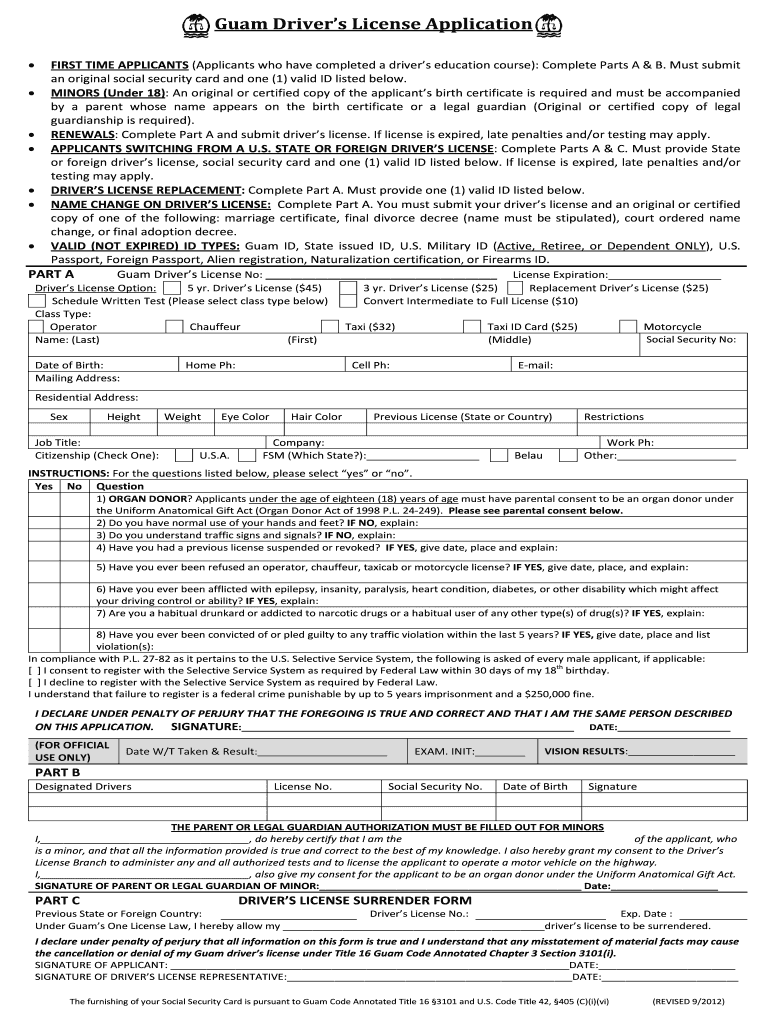
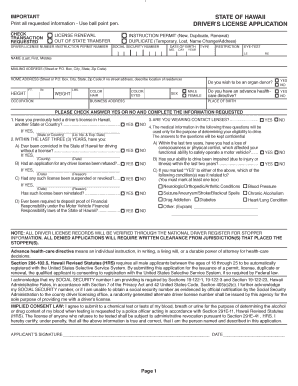
GU Driver's License Application 2012-2026 free printable template
pdfFiller is not affiliated with any government organization

Fill out
Complete the form online in a simple drag-and-drop editor.

eSign
Add your legally binding signature or send the form for signing.

Share
Share the form via a link, letting anyone fill it out from any device.

Export
Download, print, email, or move the form to your cloud storage.
Why pdfFiller is the best tool for your documents and forms


End-to-end document management
From editing and signing to collaboration and tracking, pdfFiller has everything you need to get your documents done quickly and efficiently.
Accessible from anywhere
pdfFiller is fully cloud-based. This means you can edit, sign, and share documents from anywhere using your computer, smartphone, or tablet.
Secure and compliant
pdfFiller lets you securely manage documents following global laws like ESIGN, CCPA, and GDPR. It's also HIPAA and SOC 2 compliant.
What is GU Driver's License Application
The Guam Driver’s License Application is a government form used by residents to apply for a driver’s license in Guam.
pdfFiller scores top ratings on review platforms




This website is awesome for any pdf…
This website is awesome for any pdf files that need to be edited. I had a few problems along the way but once you figure it out and get use to it, its a breeze.
Would love to learn more about all the features it has to offer. Shortcuts, and other tips and tricks to make my work more time-efficient.
I didn't have any problem yet with pdfFiller. Helped a lot!
good information and resources
PRACTICAL
This is my review
This is my review - makes pdfs versatile and usable. A great place to be at this point in technology.
Who needs GU Driver's License Application?
Explore how professionals across industries use pdfFiller.

GU Driver's License Application is needed by:
-
First-time applicants for a driver's license in Guam
-
Minors seeking a driver's license with parental consent
-
Individuals needing to renew or replace their driver's licenses
-
Those changing their name on an existing driver’s license
-
Representatives assisting applicants with the form
-
Guardians submitting applications for minors
Comprehensive Guide to GU Driver's License Application
What is the Guam Driver’s License Application?
The Guam Driver’s License Application is a vital form used to apply for a driver’s license in Guam. This form facilitates various scenarios, including first-time applications, license renewals, and replacements. Each section of the application caters to different needs, ensuring a streamlined process for new drivers as well as those updating their licenses.
The application requires signatures not only from the applicant but also from parents or legal guardians in cases involving minors. Completing the form accurately is crucial for establishing driving privileges in Guam.
Purpose and Benefits of the Guam Driver’s License Application
A driver’s license is essential for residents of Guam, granting them the ability to drive legally and access necessary services. Being legally licensed helps individuals comply with local regulations, fostering safety on the roads.
Moreover, the Guam Driver’s License Application plays a significant role in maintaining driving privileges for both new and existing drivers. This application ensures that individuals can conveniently manage essential documentation and stay compliant with driving laws.
Eligibility Criteria for the Guam Driver’s License Application
Eligibility for the Guam Driver’s License Application is determined by age and residency status. First-time applicants must meet minimum age requirements, while provisions exist for minors seeking a license with parental consent. Additionally, applicants moving from other states or countries must provide relevant documentation.
To qualify for license replacements or name changes, certain criteria must be met as well. Understanding these eligibility requirements is critical for a smooth application process.
How to Fill Out the Guam Driver’s License Application Online (Step-by-Step)
Filling out the Guam Driver’s License Application online involves several essential steps:
-
Visit the designated website where the application form is hosted.
-
Input personal information, including full name and address.
-
Answer any health-related questions provided in the application.
-
Review the document thoroughly to avoid common errors, such as missing signatures or incorrect information.
Properly completing key fields ensures a lower likelihood of application rejection and expedites the processing time.
Required Documents and Supporting Materials
To successfully submit the Guam Driver’s License Application, applicants must provide specific documentation:
-
Identification documents proving identity, such as a birth certificate or passport.
-
Proof of residency within Guam, which may include utility bills or lease agreements.
-
If applicable, additional health-related information may be necessary.
-
Minors need a parent’s or guardian’s identification and signature.
Being prepared with all necessary documents enhances the chances of application approval.
How to Submit the Guam Driver’s License Application
Submitting the completed Guam Driver’s License Application can be accomplished through various methods:
-
Online submission through the official application portal.
-
In-person submission at designated government offices.
After submission, applicants may receive a confirmation notice. Understanding the associated fees and deadlines is crucial to ensure compliance with the application process.
Common Rejection Reasons and Solutions
Applicants should be aware of common reasons that may lead to application rejections. These can include incomplete forms, inaccurate personal details, or failure to provide necessary documents.
To improve the likelihood of acceptance, consider these practical tips:
-
Double-check all entries for accuracy before submission.
-
Ensure all required documents are attached and legible.
Reviewing the application thoroughly can help mitigate risks associated with rejections.
Security and Compliance for the Guam Driver’s License Application
Security is a top priority when handling the Guam Driver’s License Application. PDF security features help protect sensitive personal information, ensuring compliance with regulations such as HIPAA and GDPR. Applicants are encouraged to use trusted platforms for submitting forms securely.
Taking precautions with data privacy is essential to safeguarding personal information during the application process.
Enhance Your Application Process with pdfFiller
pdfFiller offers an efficient solution to simplify the Guam Driver’s License Application process. With capabilities such as editing, eSigning, and secure document storage, users can manage their applications effectively.
To get started, visit pdfFiller’s platform and access the necessary forms to streamline your driver’s license application experience.
How to fill out the GU Driver's License Application
-
1.Access the Guam Driver’s License Application form by navigating to pdfFiller and searching for the form by its name.
-
2.Once located, open the form to begin filling out the required fields directly on the interface.
-
3.Before starting, collect personal information, identification documents, and any other relevant details necessary for completion.
-
4.Navigate through the form to fill in necessary fields such as your name, contact information, and answer health and driving history questions.
-
5.If you are a minor, ensure your parent or legal guardian is present to fill in their info and provide a signature where required.
-
6.Review all entered information for accuracy, and make sure to check all relevant boxes as instructed on the form.
-
7.Finalize your form by confirming all fields are complete, and you have included any necessary attachments or documents.
-
8.Save your progress and download the form if needed, or submit directly through pdfFiller when you're ready to proceed.

Who is eligible to apply for a driver's license using this form?
Eligibility includes residents of Guam who are first-time applicants, minors requiring parental consent, or individuals needing to renew or replace their driver's licenses.
What documents are required to complete the Guam Driver’s License Application?
Applicants are typically required to provide personal identification, proof of residency, and any related documents based on health or driving history, which helps in processing the application.
How do I submit my completed application?
Once your application is completed on pdfFiller, you can either save and download it for submission in person or submit it directly through the online platform, depending on available options.
What common mistakes should I avoid when filling out the form?
Common mistakes include omitting required fields, incorrectly filling out information, and failing to obtain necessary signatures from parents or guardians for minors.
Are there fees associated with applying for a driver's license?
Yes, there are typically fees involved in applying for or renewing a driver's license. Check with Guam’s Department of Motor Vehicles for specific amounts and payment methods.
Is notarization required for the Guam Driver's License Application?
No, notarization is not required for this application, but signatures from the applicant and guardians must be included where necessary.
How long does it take to process the driver's license application?
Processing times for driver's license applications can vary, so it's advisable to check with the Guam DMV for the most current information on expected timelines.
GU Driver's License Application Form Versions
Related Content
Related Forms





Get the latest insights from our blog


If you believe that this page should be taken down, please follow our DMCA take down process
here
.
This form may include fields for payment information. Data entered in these fields is not covered by PCI DSS compliance.